
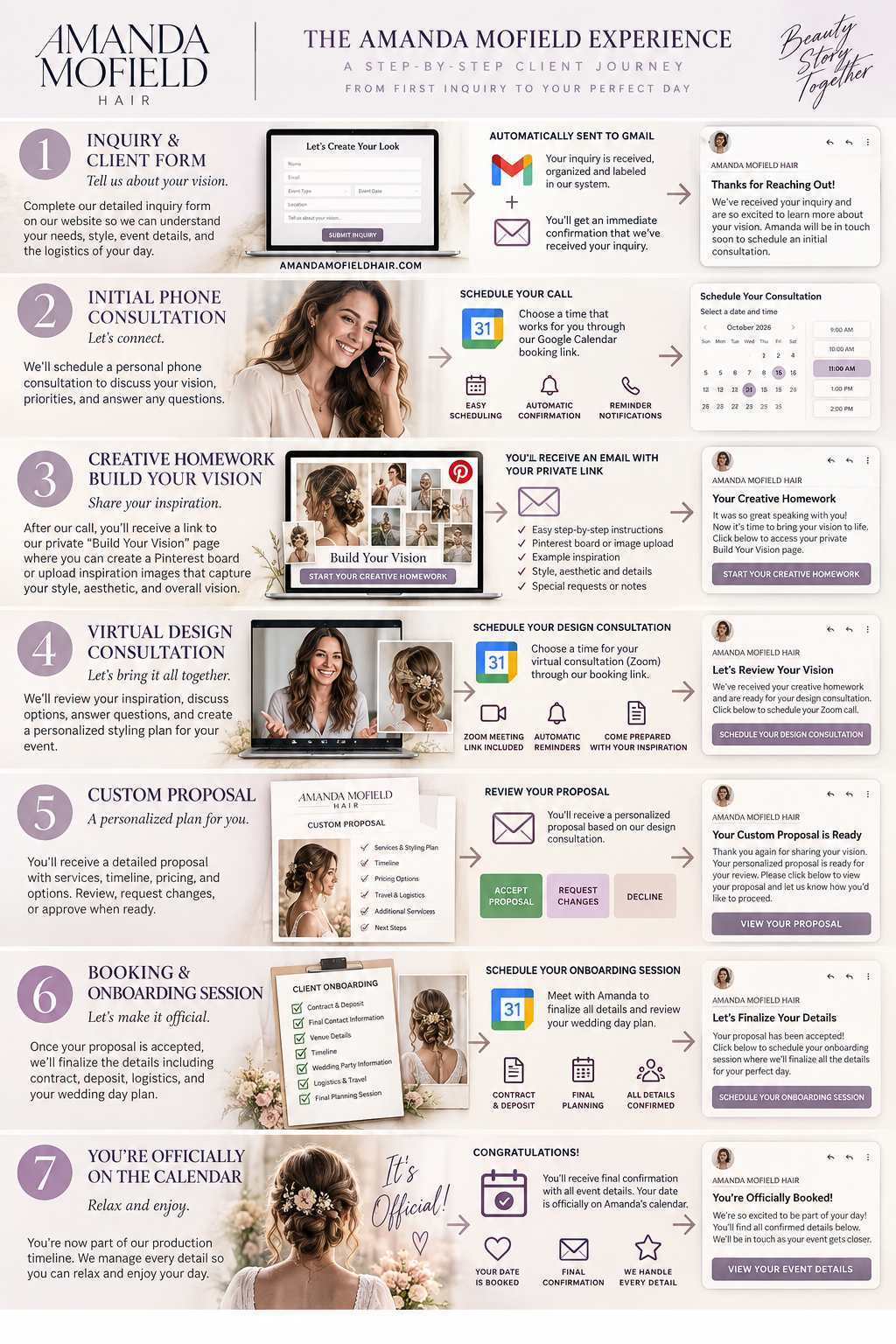
1. Inquiry → Gmail
Platform: Squarespace + Gmail
The client completes Amanda's Squarespace inquiry form. Amanda receives the submission in Gmail, and the client receives an immediate confirmation.
Gmail can use filters to categorize these submissions automatically. Gmail can also send a saved template automatically when a filter matches a message. Google Help
Status: NEW INQUIRY
The important thing is that we don't necessarily give every random inquiry access to Amanda's calendar. Amanda reviews it first.
2. Schedule Your Initial Consultation
Platform: Google Calendar
And yes — this is an actual Google Calendar feature, called Appointment schedules.
Amanda can create a public booking page where she defines:
20-minute consultation
Days Amanda accepts calls
Hours available
Buffer time
How far in advance someone can book
Phone call or Google Meet
Information the client must provide
Confirmation
Reminder emails
Google automatically removes times when Amanda is unavailable and places the booked appointment directly onto her calendar. Google Help
Even better, Google lets you put the booking page directly into a Gmail message, and Google supports embedding the appointment booking interface/button on Squarespace. Google Help
So Amanda's email can simply say:
We'd love to learn more about your plans. Please choose a convenient time for your initial consultation.
SCHEDULE YOUR CONSULTATION →
That button opens Amanda's actual Google booking page.
Status: CONSULTATION SCHEDULED
3. After the Call → Creative Homework
Platforms: Gmail + Squarespace + Pinterest
Here's where I'd modify your idea slightly.
Don't create another signature. Create a Gmail template called:
03 — Your Creative Homework
Amanda finishes the initial phone consultation. If the client is moving forward, she inserts that template and sends it.
The email says essentially:
It was great speaking with you. Now let's start building your vision.
START YOUR CREATIVE HOMEWORK →
That button goes to a new hidden Squarespace page we're going to build.
Something like:
AmandaMofieldHair.com/build-your-vision
That page becomes the client's instructions center.
It can explain:
STEP 1 — Create Your Pinterest Board
Examples of what Amanda wants them collecting.
STEP 2 — Show Us What You Love
Hair inspiration
Makeup inspiration
Dress / wardrobe
Venue
Colors
Overall aesthetic
STEP 3 — Show Us What You DON'T Want
This is actually useful creative information.
STEP 4 — Submit Your Board
Give us the Pinterest URL plus any notes.
So instead of Amanda explaining the homework differently every time, the webpage teaches the process.
That's one of the new pages we need to build.
4. Homework Period → Design Consultation
This is the interesting automation.
You suggested giving them 5–7 days, which makes sense.
Once Amanda sends the Creative Homework email, the client gets several days to work.
Then:
Day 0
Creative Homework email
Around Day 4
Potential gentle reminder:
How's your vision coming together?
Around Day 6 or 7
Next-step email:
Let's Review Your Vision
with:
SCHEDULE YOUR DESIGN CONSULTATION →
That points to a second Google Calendar Appointment Schedule:
Virtual Design Consultation
Approximately 45 minutes.
Google Calendar can generate the booking page and include Google Meet conferencing. Appointment schedules also support booking confirmation and up to five reminder emails, although Google notes that the text of those Calendar reminder emails isn't customizable. Google Help
So we need to distinguish two types of automation:
Google Calendar reminders = appointment logistics.
Amanda-branded Gmail emails = creative journey and messaging.
That's important.
For the branded Day 4/Day 7 messages, Gmail has Schedule send, but that's a scheduled email rather than a sophisticated CRM-style conditional sequence. Google Help We can start with Gmail and later decide whether the volume warrants a dedicated automation/CRM platform.
5. Design Consultation → Custom Proposal
This is where Amanda and the client have the substantive creative meeting.
Amanda has their:
Initial inquiry
First consultation notes
Pinterest board
Inspiration
Event information
Creative preferences
Logistics
Service requirements
Now she can actually scope and price the project.
Then:
CUSTOM PROPOSAL
This is the one component where I wouldn't choose the platform yet.
We need something capable of:
View Proposal
Accept
Request Changes
Decline
Potentially:
Electronic signature
Contract
Deposit
Payment schedule
And the workflow needs to support:
Proposal V1 → Changes requested → Amanda revises → V2 → Accepted
Rather than forcing Squarespace or Gmail to do something they're not designed to do, we'll evaluate proposal/contract platforms specifically for Amanda.
Once we select one, Amanda gets another Gmail template:
05 — Your Custom Proposal Is Ready
We've taken everything we discussed and created a personalized plan for your event.
VIEW YOUR PROPOSAL →
6. Accepted → Booking & Onboarding
This is the key distinction:
Proposal accepted ≠ officially booked.
We decide what constitutes BOOKED.
I would probably define it as:
Proposal accepted ✓
Contract signed ✓
Deposit received ✓
Once those three happen:
BOOKING & ONBOARDING
Client receives:
You're almost there. Let's finalize the details.
Potentially another hidden website page:
/client-onboarding
That page can collect:
Venue
Address
Primary contact
Wedding party
Service counts
Arrival information
Parking/loading
Hotel/travel
Timeline
Photographer/planner contact
Special requirements
And then:
SCHEDULE YOUR ONBOARDING SESSION →
This could be a third Google Calendar Appointment Schedule if we determine a dedicated meeting is necessary.
7. Officially Booked
Only after the required pieces are complete do we move them to:
YOU'RE OFFICIALLY ON THE CALENDAR
Now we create the actual wedding/event entry on Amanda's Google Calendar.
Not a consultation.
Not a Zoom meeting.
The actual event.
For example:
SMITH / JOHNSON WEDDING — AMANDA MOFIELD HAIR
Saturday, June 12, 2027
Napa Valley
Internally, Amanda now has the event locked into her production calendar.
Client gets:
07 — You're Officially Booked
with the major details confirmed.
Status: BOOKED
The important distinction
We're actually building four interconnected systems:
Squarespace = CLIENT PORTAL
Inquiry → Creative Homework → Onboarding
Gmail = COMMUNICATION
Confirmation → Consultation invitation → Homework → Reminder → Proposal → Onboarding → Confirmation
Google Calendar = SCHEDULING
Initial consultation → Design consultation → Onboarding session → Actual event
Proposal platform = BUSINESS TRANSACTION
Proposal → Revision → Acceptance → Contract → Deposit
That is much cleaner than trying to make Gmail do everything.
And this reveals the new pages/templates we need
We already have the Inquiry Form.
Now we need:
NEW WEBPAGE: Creative Homework / Build Your Vision
NEW GOOGLE CALENDAR: Initial Consultation
NEW GOOGLE CALENDAR: Virtual Design Consultation
NEW GMAIL TEMPLATE: Schedule Your Initial Consultation
NEW GMAIL TEMPLATE: Your Creative Homework
NEW GMAIL TEMPLATE: Creative Homework Reminder
NEW GMAIL TEMPLATE: Let's Review Your Vision
NEW PROPOSAL SYSTEM: Custom Proposal
NEW GMAIL TEMPLATE: Your Proposal Is Ready
NEW WEBPAGE: Client Onboarding
NEW GOOGLE CALENDAR: Onboarding Session
NEW GMAIL TEMPLATE: You're Officially Booked
That's the actual infrastructure underneath the seven pretty boxes in your infographic.
The next thing I'd build is #2 — Amanda's Initial Consultation booking page in Google Calendar. It's an existing Google feature, doesn't require another service, and once we create it we'll have the first real link that goes into the automated client journey.